Wednesday, August 19, 2020

16 Ways to Speed Up Your WordPress Website Today! 2021

16 Ways to Speed Up Your WordPress Website Today! 2021


Speeding up your website is the only guaranteed way to get more traffic and make more sales.

In 2010, Google confirmed that site speed is one of over 200 indicators that impacts search rankings. Their data shows that when pages load slowly, people spend less time. Yet most of us put little focus into making our websites faster.

Maybe fine-tuning the inner speed triggers of your WordPress website is too daunting.

To shed light on cutting your load time in half, we invited Stavros Papadakis to lay out his process for speeding up client websites.

If your load time is more than 3 seconds or your page size is over 2MB, that can be a big problem that’s costing you money, both in lost sales and server fees.

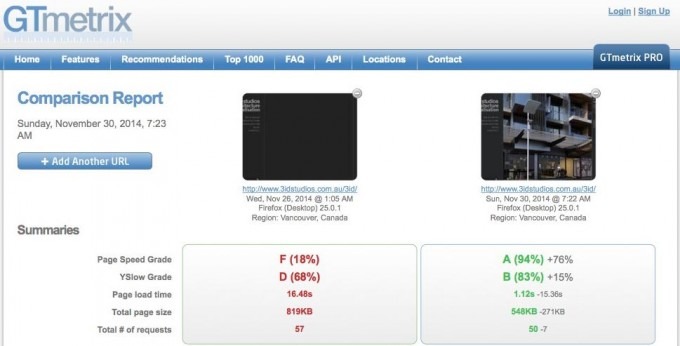
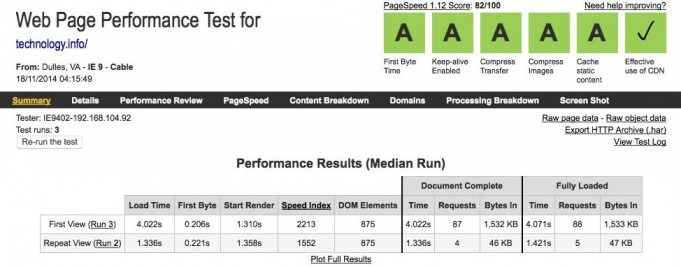
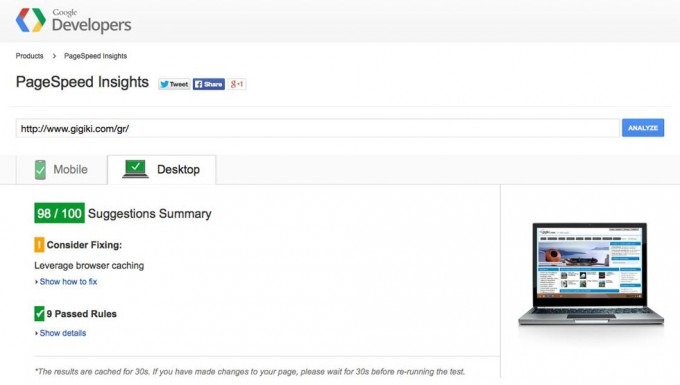
There are many free online tools such as WebPageTestGTmetrixGoogle PageSpeed Insights and Pingdom that can help you identify issues that cause slow loading times and bad user experience for your site.

Here’s how to take charge of your website’s performance.

1. Enable compression

Compressing your CSS and Javascript files will help browsers download them faster.

Gzip compression can easily reduce file sizes from 200+KB (non-compressed) to less than 40KB (compressed). As long as your server has compression enabled, take advantage of it.

You can be sure that your users will experience a drastic speed up of your site for both desktops and mobiles by enabling compression at your server.

Add the following snippet of code at your .htaccess file in order to enable compression for static files.

AddOutputFilterByType DEFLATE application/x-httpd-php text/php text/html text/plain text/css text/xml application/x-javascript text/javascript application/javascript text/x-js

BrowserMatch ^Mozilla/4 gzip-only-text/html
BrowserMatch ^Mozilla/4\.0[678] no-gzip
BrowserMatch \bMSIE !no-gzip !gzip-only-text/html
Header append Vary User-Agent

2. Optimize your images

Images are the main culprit for slowing a website. Always optimize your images (especially those above 50KB) before uploading them to your website.

The optimal way of optimizing them is to use Photoshop or any other image manipulation software. Save images for web with image quality up to 60%.

You should also use progressive images for JPG files because progressive rendering of images provides a smoother user experience.

Please check the following two images, they look the same but the left one is non-optimized and is 80KB and the one to the right is optimized and it is only 18KB, 4 times smaller.

Non Optimized Image - Oia Greece Santorini

Non-Optimized Image

Optimized Image

3. Move Javascript files to the footer

Although Javascript libraries such as jQuery, Mootools and Prototype are awesome because they extend your website’s functionality, they can also block the rendering of your pages.

Browsers don’t start loading the content until all the Javascript files in the header of the page have been downloaded.

An easy way to solve this problem is to move your Javascript files, those which are not required during the initial page rendering, from the header to the footer of the page.

If you use WordPress, you can move script calls from header.php to footer.php at your theme and use true as the fourth parameter whenever you use the wp_enqueue_script function.
Move JS scripts to the footer of the page

Move JS scripts to the footer of the page

4. Make sure that you have KeepAlive enabled

Apache (the most commonly used server for shared hosting plans at low-cost hosting companies) has a great “feature” called KeepAlive which keeps connections open for more than one HTTP request.

Make sure KeepAlive is activated at your hosting company.

If you have access to your httpd.conf file, enable KeepAlive by making sure that you have “KeepAlive On” in it, otherwise just add the following piece of code at your .htaccess file.

<ifModule mod_headers.c>
Header set Connection keep-alive
</ifModule>

Enable KeepAlive for your server/site

Enable KeepAlive for your site

5. Merge CSS files – Inline small CSS files

Browsers only handle so many HTTP requests at the same time. When this limit is reached, some files wait while others are downloaded.

By merging all your CSS files into one CSS file only, the page renders much faster.

If you have CSS files which are less than 2KB, then you should inline them instead of making an extra HTTP request.

WordPress has a few great plugins such as Autoptimize and Better WordPress Minify that can be help you merge or even inline your CSS stylesheets.
Merge CSS files and Inline them

Merge CSS files and Inline them

6. Enable caching

Caching drastically improves the load time of pages that do not change that often.

By enabling caching at your site, your code doesn’t keep generating the same page over and over again. This way the user experience is much better and your server can handle more traffic.

W3 Total CacheWP Super Cache and WP Fastest Cache are just a short selection of free WordPress plugins that provide different kind of caching e.g. page caching, database caching and object caching among others.
W3 Total Cache WordPress plugin

W3 Total Cache plugin provides page, DB and object caching

7. Use a Content Delivery Network

Whether you use a CMS like WordPress, Joomla, Magento, Drupal or a custom-made PHP or HTML site, I highly recommend configuring a Content Delivery Network (CDN).

A CDN is a distributed system of servers deployed in multiple data centers across the internet.
When a client visits your site, static content like images and CSS files are served from the server that is geographically closest them so they are rendered much faster.

By the way, the load on your server is also drastically reduced thanks to a CDN.

CloudFlare is a free CDN and DNS provider among others. MaxCDN is also a great and affordable option to optimize the loading time of your site. They are both as good as they can get.

CloudFlare Content Delivery Network

CloudFlare is a free Content Delivery Network

8. Minimize the number of HTTP requests

The more HTTP requests you have, the slower the loading time of your site will be.

Combine your CSS files, merge Javascript files, and combine images in data sprites among others to make as few HTTP requests as possible.

When I work on a client’s site, one of my major goals is to minimize the number of HTTP requests loaded per page.
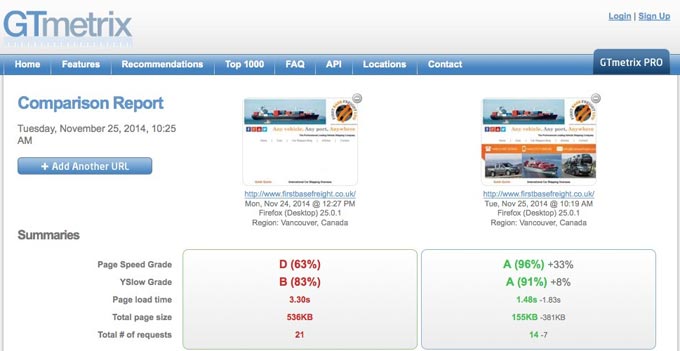
Minimize HTTP requests

Merge CSS files, use data sprites or data URIs in order to reduce the number of HTTP requests

9. Choose the correct file type for your images

Use JPG as your default. It’s the smallest and fastest loading file type.

Use PNG only for images with text (JPG rasterizes text which makes it blurry) or if you need a transparent background.

Minimize or even eliminate any heavy GIF files because they can drastically slow down the loading time of your site.

Although the following two images look the same, there is a huge difference between them. The one to the left is saved as a png file and weighs 102KB and the other one is a JPG file with a size of 18KB, that’s right, 6 times lighter!

Image saved as PNG

Image saved as PNG

Image saved as JPG

Image saved as JPG

10. Fix your 404 errors

Believe it or not, any missing file generates a 404 HTTP error and will definitely slow down the loading time of your site.

Always check for any 404 errors during the rendering of your pages to achieve the fastest loading time.

If your “waterfall” (the way the browser renders your site) looks like that (watch out for any red rows), then 404 errors are ruining the loading time of your site.
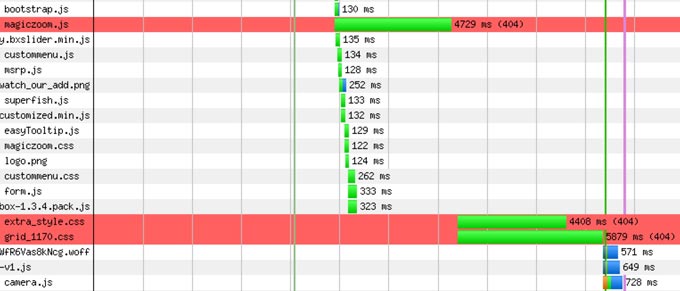
404 Errors Can Ruin Loading Time

404 Errors Can Ruin the Loading Time of your Site

11. Take care of your page size

Although it is tempting to display a lot of content in each page, you should try to keep your page size to the minimum.

This is even more crucial for mobiles. Having to load a 2MB site via mobile in a 3G connection is a recipe for disaster. Take into account that users do not like to wait for more than 2-3 seconds for a page to render.

Does a new image add value to the site? If not, then you should not add it to your site. Simple like that.
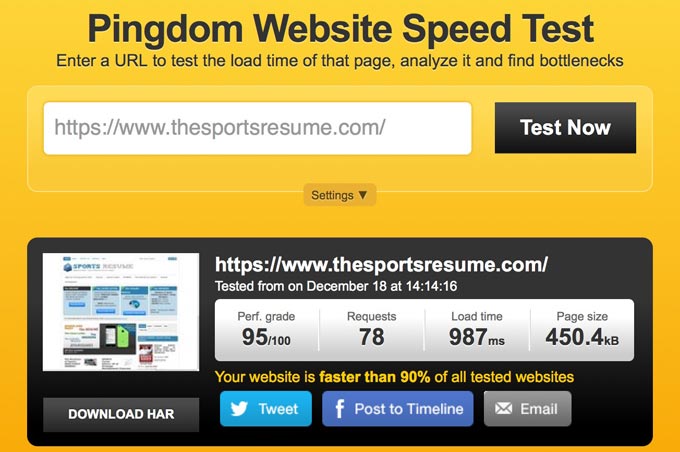
Reduce the page size

Reduce the Page Size

12. Scale images

Never scale images on the fly in HTML. Create a thumbnail of the image that you need at the exact dimensions that it will be used in your pages.

For instance, if you have an image that it is 1200px x 675px and you want to use a “scaled” version at 480px x 270px, create a new resized version of the original image and use that instead.

This image links to a “big” version of the image using a scaled thumbnail instead of changing the dimensions of the image in HTML.

scaled-image-thumbnail-width-480

Thumbnail (Scaled Image) Links to Large-Size Image

13. Leverage Browser Caching

Google recommends a minimum cache time of one week and preferably up to one year for assets that change infrequently.

Set a caching policy for all server responses to static files (images, CSS and Javascript) so the browser can determine whether it can reuse a previously loaded file or not.

This is usually done by adding this snippet of code at the .htaccess file for shared hosting plans

<ifmodule mod_expires.c>
ExpiresActive On
ExpiresByType text/html “access plus 7200 seconds”
ExpiresByType image/gif “access plus 864000 seconds”
ExpiresByType image/jpg “access plus 864000 seconds”
ExpiresByType image/png “access plus 864000 seconds”
ExpiresByType text/css “access plus 864000 seconds”
ExpiresByType text/javascript “access plus 864000 seconds”
ExpiresByType application/javascript “access plus 864000 seconds”
</ifmodule>

14. Optimize your database

As long as you have a database-driven site (which includes WordPress and all other CMS-based sites), then be sure to optimize your database.

Monitor your code for slow queries. If you are on a VPS or dedicated server, enable query caching and optimize your database server configuration.

Although full database optimization can be a really tricky and time-consuming process, phpMyAdmin offers you a few basic optimization options  by “optimizing your tables”.
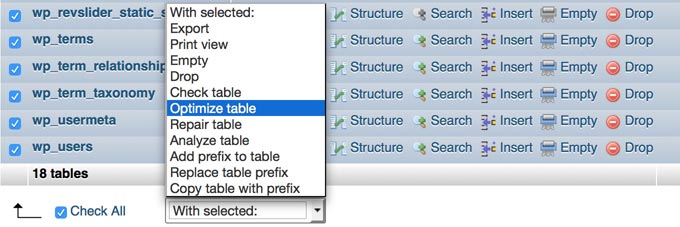
Optimize your Database via phpMyAdmin

Optimize your Database via phpMyAdmin

15. Select your hosting company wisely

Choose a hosting plan that meets your site needs.

Most hosting companies apply limitations to their shared hosting plans and host hundreds of sites per server to keep the fees to the minimum.

You get what you pay for. If you have an Ecommerce site, a heavy CMS, a lot of traffic or traffic spikes, avoid shared hosting plans.

I highly recommend WPEngine managed WordPress hosting company for any eCommerce WordPress site or any WordPress site with traffic spikes.

16. Hire an expert

My goal is to give you enough information to get started optimizing your website speed.

But as you know, it’s best to hire an expert when it’s important to get it right.

One of my clients contacted me in order to optimize the loading time of his website. The website pages were taking a long time to load and visitors were complaining because the user experience was bad.

I updated WordPress to its latest version, migrated the website to a reliable hosting company and applied speed optimization tweaks to achieve the best feasible loading time.

The loading time went from 8.2 to 2.6 seconds. The first byte and start rendering time was optimized down to 0.147 and 0.384 seconds respectively and the number of HTTP requests was reduced from 96 to 78. Google PageSpeed Insights was also optimized to 88%.

Bounce rate decreased by about 10% within a few weeks. The client and more importantly the website users were happy and maintaining the site became a great experience.

To sum it up, optimizing the loading time of your site is a win-win situation for you and your potential clients.

Imagine how happy your users will be to see super fast loading times!

If you want to hire me, I’m happy to help. See my portfolio and contact me on AwesomeWeb today!

Conclusion

Everything improves when your site loads faster.

Google ranks you higher. Users are happier. Bounce rates decrease. Conversion rates increase. And you make more sales.

Stop losing traffic and money. Start optimizing the loading time of your site today.


18 Ways To Optimize Your Website For More Traffic and Higher Conversions 2021

18 Ways To Optimize Your Website For More Traffic and Higher Conversions 2021


When it comes to website optimization, there is a lot you can be doing if you want to increase sales, get more traffic and have higher conversions.

What is website optimization? To me, it’s how you can improve your website so that it works better.

I know I have some very loyal readers here at IncomeDiary.com and I would hate for you to miss out on some great website optimization techniques and simple tricks and tips that can make the difference between 10 website views and 10,000 website views so here we have a huge list of what I feel are the best lessons you could learn TODAY.

Remember that as online entrepreneurs and website owners, we run the risk of being left behind because the internet is a very fast paced industry to work within. That being said, these neat website optimization tips and resources should have you up-to-date and ahead of the game. I hope these all help you massively, and if you know some blog posts that should have been featured in this post then please do leave them in the comments and we will add them!

How Website Optimization Can Increase Your Sales and Traffic

#1 Reduce Your Website Bounce Rate

Your website bounce rate is what percent of people left your website without visiting more than one page. The lower your bounce rate, the better.

If website optimization is important to you, this is something you need to be improving.

Here are my top tips to get started:

  • Interlink blog posts
  • Reduce adverts
  • Improve readability
  • Keep content up to date
  • Increase website speed
  • Add related or popular posts to the bottom of articles
  • Test different anchor text for website navigation
  • Reorder posts on category pages to show most popular
  • Improve featured images for posts

You will notice that improving your bounce rate, is also going to help your search engine optimization.

#2 Optimize Your Website For Search Engines

Search engine optimization is one of the best ways to spend your time if you want to increase traffic to your site. With literally millions of other people and blogs to compete with; you have to work hard to stay ahead of the game.

So many people manage to cover most areas of importance when starting a blog with the exception of SEO. This can be disastrous for your blogs future and because of this, you need to learn as much as you possibly about the subject. Get clued up on the best SEO tools and techniques, this will put you one step ahead of the competition! Make sure to follow these 10 SEO blog publishing steps that most bloggers forget.

Here are my top tips that I focus on when it comes to optimizing my website for search engines:

  • Do keyword research
  • Reduce bounce rate
  • Fix broken links
  • Increase page speed
  • Make sure my pages have over 2000 words
  • Get more backlinks
  • Add a sitemap

From this list, you will probably notice that search engine optimization isn’t just about writing great content, but it’s also a lot about how you user friendly your website is. It makes sense really, the better your website is, the more Google wants to link to you.

Optimizing Your Website For Search Engines

#3 Split Test Your Website

Split testing is another topic that can dazzle blogging newcomers and can leave them dazed and confused in the wake of a ton of supposedly informative articles. The problem with many of the articles you may read on this subject is that they are usually aimed at the more advanced bloggers which can really hinder those with little to zero understanding of what split-testing actually is.

I feel it is my duty to you my readers, to aid you in understanding this mysterious subject matter because I want you to succeed and to succeed as well as possible. Check out these posts on conversion optimization.

Not sure what to split test? Here is some of the things we are testing:

  • Headlines
  • Colors
  • Button text
  • Design vs Design
  • Borders
  • Images

#4 Increase Your Website Speed

Increasing website speed will increase conversions and search engine rankings, that’s why it’s one of my favorite website optimization techniques. It amazes me to this day that there are so few people out there that actually help their websites and blogs to run faster; the majority of people tend to create pages and posts and continue in doing so without any second thought to how their site is performing in speed. This can be a very major issue at times and it is one that I think you will great suffer from if I do not aid you in understanding how to make your website or blog run faster.

I’m sure a great deal of you reading this will have at times, been patiently waiting for a website to load only to click the ‘Back button’ and search for something different instead? If you have, and you HAVE clicked that button; what makes you think that your readers will not do the same if YOUR site is running at a snails pace?

Here are 18 Things Making Your Website Slow.

#5 Optimize Your Email Marketing Signup Area

This is another major question that a lot of new bloggers ask and while it is a valid and important question it is also very simple to put into effect. Some bloggers give up when they are unable to find new subscribers and this should not be the case, instead it should make you even more passionate about your blog because you want it to be the best it can be.

Subscribers are definitely the way forward for numerous reasons and loyal ones will aid you greatly whether by spreading the word about your blog by mouth or by a review on your site or maybe even a YouTube video, there is no question that subscribers are the life support that your blog needs in order to stay top of the ladder.

Our top tip for getting email subscribers? Use OptiMonk.

So you have created your blog, you have traffic heading to it on a daily basis and you have even started to build up an email list; how do you go about marketing via email? These great posts should help:

#6 Offer Amazing Customer Service

Customer service pays for itself in so many different ways.

Firstly, it will increase your conversion rate because it’s something people care about when they buy a product. If a customer has a problem with your service, they want to know that they can get help straight away, not wait days for each support response. Given the option between two similar products, one with live support, I’m going to take the one with live support.

Secondly, if your customer service is amazing, customers will cancel and refund a lot less.

And thirdly, if your customer service is amazing, they will buy more products from you.

Our support hours are weekly from 7am till 10pm GMT. We offer email support, live chat and we have documentation for our software. It’s important to us that you are happy.

#7 Add Upsells To Your Sales Funnel

Launching your own product is a great way to make more money online.

To make even more money from your products, add upsells. An upsell is a one time offer that is shown directly after they purchase your product. If you get this right, you can double you income with this one tip alone.

When we first launched PopUp Domination, we had no upsells. After a few months we noticed that our customers were requesting multi site licenses and more popup designs, so we started selling them. But what made the biggest difference was adding them as an upsell, directly after they purchase.

Think about it, they already put their credit card details in, they are in buying mode, converting someone to buy something right after they bought your product, is a lot easier than doing it later. This one change saw us increase sales by 100%.

#8 Increase Your Affiliate Sales With Coupon Codes and Comparison Tables

Affiliate marketing is a great way to start earning money with your blog or website.

When it comes to increasing affiliate sales, some of the best advice I can give you is to offer a coupon code. Customers like to think they are getting a good deal and if they see a coupon, they will think they are getting a better deal.

Another reason why this will boost conversions is because often when someone goes to buy and lands on the checkout page, they see a coupon code field. This makes them think, I could get a better deal if I could get a coupon code for this product. So they go to Google and find a coupon and end up buying through someone elses link. You can prevent this by giving them the coupon code in the first place.

The other big thing I suggest is to show a comparison of prices and features. This lets them see that your recommendation is the best choice and if they decide to use a different product, you will also earn.

Affiliate Comparison Tables

#9 Increase Your Income By Using Multiple Monetization Techniques

It’s important to diversify your income in order to make more of it, it sounds simple and in reality it is a simple thing to do; however there are a lot of people out there blogging that simply stay focused on just one stream of income and this can be detrimental to what they are trying to achieve. Maybe you are one of these people? Have you started to make money in one certain way and just stuck to that technique?

If you have I commend you in taking action and giving yourself a great head-start; the problem is that you are too focused on that one stream of income to see that there are probably a dozen other ways to make even more money online. Some of those ways may even be 100% more effective.

Read: 14 Ways To Actually Make Money From a Website

#10 Keep Your Website Up To Date

Keeping your website up to date will improve your search engine rankings, reduce your bounce rate and increase conversions.

No one wants to read out dated blog posts. No one wants to buy a product they don’t think is still relevant. Everyone coming to your website wants to know that your site is the best and it’s worth them spending time on it.

Here are a few things you need to make sure are kept up to date:

  • Copyright date
  • Mentions of dates in posts
  • Blog content
  • Fix broken links
  • Keep social media accounts up to date

#11 Make Sure Your Blog Is Secure!

Hackers, Spammers they are all out to get you, no matter who you are, what niche your blog is involved in or even how long you have been online. It can feel as though it is a personal vendetta against you but don’t take it personally it happens to the best of us.

This is why it is important to look after your blogs security so that you can continue to give your readers valuable content without being constantly attacked by an unknown force. Spammers are constantly sending emails to just about every blog on the planet and although they in themselves are not damaging, the messages that they can leave all over your blog can be.

#12 Optimize Your Website Design

This is yet another topic that brings with it numerous amounts of daily emails; a big part of website optimization is improving the design of your blog, it’s right up there with SEO. Sure the SEO does all of the hard work, bringing the traffic to your site; but the design can be just as important.

I’m sure most of you have had the experience of clicking on a top ranked result in Google for one of your searches, only to find that once the website has loaded the design is absolutely dire! So what do you do? You go ahead and click on the ‘Back button’ yet again, and this is something that your very own readers could end up doing.

That’s why it is important to get the design just right from the word go; this isn’t to say you should pour thousands of dollars into it (you can do that later when you are ready to upgrade) it simply means that you should try and stand out from the crowd and become a shepherd instead of a sheep.

#13 Optimize Your Website Code

I think this is something that 80% of bloggers know nothing about; and it is a shame really because improving the code on your site can be very rewarding. The internet is built on the foundations of thousands of codes and algorithms, so are the search engines and believe it or not so is your blog or website.

It may sound a little confusing but by making your coding look ‘beautiful’ you can really get the best out of your blog; the question you may have on your lips is “How can code be beautiful?” a very valid point. Beautiful code is what helps; the search engines find you, the browsers to correctly display your content and your readers read your content. So when I say make your code beautiful I mean it.

#14 Improve Your Website Credibility

When someone comes to your website, it’s important to give them confidence in your business.

You can do this by:

  • Showing testimonials
  • Showing press logos
  • Showing press mentions
  • Having HTTPS in your domain
  • Proof reading your content
  • Having an about page
  • Having active social media accounts
  • Include privacy policy, terms of service and cookie policy pages. We use TermsFeed to create these documents.

Website Optimization

#15 Improve Your Website Content

Fresh ideas are sometimes hard to come by, it’s not that you have lost passion, or that you care less its that you feel you have ran out of things to say, or how to make them jump out the page to your readers.

This can all be remedied with a couple of articles (below) and some good old fashioned elbow-grease. Remember that blogging is not just about adding page after page of content, it is about inspiring people, aiding them in their daily tasks, showing them the pitfalls so they can go around them. It’s also about creating content that simply appeals to the masses; whether that means adding fewer or more images, a video or maybe an mp3 audio file on your posts.

Here are two great posts to read about content creation:

17 Writing Tips For Bloggers Who Think They Can’t Write!

How To Create Viral Content Your Readers Will Love

#16 Improve Your Website Funnel

When someone visits your website, you want to take them through a journey. It may take 5 page visits before they buy and you want to help them as much as possible to effortlessly go from page to page.

Here is an example of what I’m talking about:

Blog Post > Next Blog Post > Subscribe Page > Free Video > Checkout Page > Upsell Page > Product Download Page.

You want them to go from page to page without leaving. It’s important to plan out how you want your visitors to use your site and make sure each page along the way is optimized for what you want it to do.

Use condition marketing to update the adverts on your website to reflect where a user is in your sales funnel.

#17 Optimize Your Website Design for Mobile Devices

Nearly 50% of IncomeDiary traffic is coming from mobile. If our site wasn’t optimized for mobile devices, people will leave quickly.

This doesn’t just mean they don’t buy, but because our bounce rate will increase, Google may decide our website isn’t as good and decrease our traffic.

Make sure to read 15 Best Practices for Responsible Responsive Web Design.

#18 Tracking and Analyzing Your Traffic

Again this is something that a lot of bloggers fail to do, or fail to understand the importance of doing it. Tracking and analyzing can help you with your blog or website in a plethora of ways; all of which can bring in a great deal of income.

Do you understand how the average user of your site reads your content? Do you know how many times that ‘Click Here’ link has been clicked? If not then how can you have a definite idea of where you are going right, and more importantly where you are going wrong. If you are able to track and analyze your blog or website then you can find what you are doing wrong, change it, and keep doing so until the problem no longer arises. you see, with website optimization, tracking and analysis, comes real opportunity to make your blog better, which is what we all want isn’t it?

There you have it, my 18 top tips for website optimization.