Static websites have fixed content with no backend processing. They can contain HTML pages, images, style sheets, and all of the files required to render the website, but there is no server-side scripting or database. If desired, the web pages can provide interactivity and run programming logic by using JavaScript, which runs within the user's web browser.
You can easily host a static website on Amazon Simple Storage Service (Amazon S3) by uploading the desired content and making it publicly accessible. No servers are required, and you can use Amazon S3 to store and retrieve any amount of data at any time, from anywhere on the web.
Objectives
After completing this article , you will be able to:
Create a bucket in Amazon S3
Upload content to an S3 bucket
Enable public access to S3 bucket objects
Update a static website hosted in Amazon S3
Duration
This Article Procedure requires approximately 20 minutes to complete.
Common Login Errors
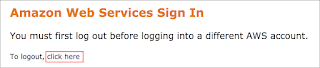
Error: You must first log out
If you see the message, You must first log out before logging into a different AWS account:
Choose click here
Close your browser tab to return to your initial Article window
In this task, you create an Amazon S3 bucket and configure it for static website hosting.
In the AWS Management Console, on the Services menu, click S3.
Note Click Switch to the new console on the top of the page if you see the option.
Click Create bucket
An Amazon S3 bucket name is globally unique, and the namespace is shared by all AWS accounts. This means that after a bucket is created, the name of that bucket cannot be used by another AWS account in any AWS Region until the bucket is deleted.
Therefore, for this article you will use a bucket name with a random number, such as website-123
For Bucket name enter: (Replacing 123 with a random number)
For Region, select the Region value that is located to the left of these instructions.
You will not be able to create your bucket in any other region than the region that your Article was launched in.
In the section named Bucket settings for Block Public Access, you will notice that public access to buckets is blocked by default. The files in your static website will need to be publicly accessible, so you will need to permit access.
Deselect (turn off) Block all public access.
I acknowledge that...
Click Create bucket
Click the name of your new bucket.
You will now configure the bucket for Static Website Hosting.
Click the Properties tab.
Under section Static website hosting section, click the Edit button, Edit static website hosting window will open.
Click Enable for Static website hosting.
Click Hosting type as Host a static website
For the Index document, enter: (You will need to enter this even though it is already displayed)
For Error document, enter: (You will need to enter this even though it is already displayed)
Click Save changes
Your bucket has now been configured to host a static website.
From the Properties tab, under the section Static website hosting, click Bucket website endpoint URL. You will receive a 403 Forbidden error because the website has not been configured yet. Keep this tab open in your web browser so that you can return to it later.
Task 2: Uploading content to your bucket
In this task, you upload the static website files to your bucket.
Right-click each of the following links and select save as and type the exact name Including Extensions and file type should be all types.
Note Ensure that each file keeps the same filename, including the extension. You Can Download all the files to gather from the GitHub Repo (Recommended Option for the File to Download) https://github.com/CodeOnYT/Architecting-on-AWS
Click the Object tab on the Bucket Overview window.
Click Upload
Click Add files
Navigate to and select all of the files that you downloaded.
Click Upload
Click the Close button on the right of the Upload: status window to return back to the Bucket overview page.
Your files are uploaded to the bucket.
Task 3: Enabling access to the objects
Objects stored in Amazon S3 are private by default. This ensures that your organization's data remains secure.
In this task, you make the uploaded objects publicly accessible.
First, confirm that they are currently private.
Return to the web browser tab that showed the 403 Forbidden error, and refresh the page.
Note If you accidentally closed this tab, go to the Properties tab, click Static website hosting, and click the Endpoint link again.
You should still see a 403 Forbidden message. This is good because it indicates that your static website is being hosted by Amazon S3 but that the content is private.
There are several ways to make Amazon S3 objects public:
You can use a bucket policy to make an entire bucket or just a directory within a bucket public.
You can use an access control list (ACL) to make individual bucket objects public.
It is normally safer to make individual objects public because this avoids other objects being accidentally made public. However, if you know that the entire bucket contains no sensitive information, you can use a bucket policy.
You will now configure the individual objects in the bucket to be publicly accessible.
Return to the Object tab with the Amazon S3 console for the bucket (but do not close the website tab).
Select all 4 objects.
From the Actions menu, click Make public.
A list of the 4 objects displayed.
Click Make public
Click the Exit button on the Make public: status window.
Your static website is now publicly accessible.
Return to the web browser tab showing the 403 Forbidden error, and refresh the page.
You should now see the static website is hosted by Amazon S3.
Task 4: Updating the website
You can make changes to the website by editing the HTML file and uploading it again to the Amazon S3 bucket.
Amazon S3 is an object storage service, so you need to upload the whole file. This will replace the existing object in your bucket. It is not possible to edit the contents of an object; you must replace the whole object.
On your computer, open the index.html file in a text editor (for example, Notepad or TextEdit).
Find the text Served from Amazon S3 and replace it with Created by YOUR-NAME, substituting your name (for example, Created by Jane).
Save the file.
Return to the Amazon S3 management console for your bucket, and upload the index.html file that you just edited.
Select the index.html file and use the Actions menu to Make it public again.
Return to the web browser tab with the static website, and refresh the page. You should see your name on the page.
Your static website is now accessible on the internet. Because it is hosted on Amazon S3, it has extremely high availability and can serve high volumes of traffic without requiring any servers.
You can also use your own domain name to direct users to a static website. This involves the use of the Amazon Route 53 DNS service, which will be covered later in the course.
Conclusion Congratulations! You now have successfully:
Created a bucket in Amazon S3
Uploaded content to an S3 bucket
Enabled public access to S3 bucket objects
Updated a static website hosted in Amazon S3
End of Article Please Submit your Review.
1 star = Very dissatisfied 2 stars = Dissatisfied 3 stars = Neutral 4 stars = Satisfied 5 stars = Very satisfied
Your feedback is welcome and appreciated. If you would like to share any feedback, suggestions, or corrections, please provide the details in our
JavaScript interview questions and answers for provides a list of top 20 interview questions. The frequently asked JavaScript interview questions with answers for beginners and professionals are given below.
1) What is JavaScript?
JavaScript is a scripting language. It is different from Java language. It is object-based, lightweight, cross-platform translated language. It is widely used for client-side validation. The JavaScript Translator (embedded in the browser) is responsible for translating the JavaScript code for the web browser. More details.
2) List some features of JavaScript.
Some of the features of JavaScript are:
Lightweight
Interpreted programming language
Good for the applications which are network-centric
Complementary to Java
Complementary to HTML
Open source
Cross-platform
3) Who developed JavaScript, and what was the first name of JavaScript?
JavaScript was developed by Brendan Eich, who was a Netscape programmer. Brendan Eich developed this new scripting language in just ten days in the year September 1995. At the time of its launch, JavaScript was initially called Mocha. After that, it was called Live Script and later known as JavaScript.
4) List some of the advantages of JavaScript.
Some of the advantages of JavaScript are:
Server interaction is less
Feedback to the visitors is immediate
Interactivity is high
Interfaces are richer
5) List some of the disadvantages of JavaScript.
Some of the disadvantages of JavaScript are:
No support for multithreading
No support for multiprocessing
Reading and writing of files is not allowed
No support for networking applications.
6) Define a named function in JavaScript.
The function which has named at the time of definition is called a named function. For example
function msg()
{
document.writeln("Named Function");
}
msg();
7) Name the types of functions
The types of function are:
Named - These type of functions contains name at the time of definition. For Example:
function display()
{
document.writeln("Named Function");
}
display();
Anonymous - These type of functions doesn't contain any name. They are declared dynamically at runtime.
var display=function()
{
document.writeln("Anonymous Function");
}
display();
8) Define anonymous function
It is a function that has no name. These functions are declared dynamically at runtime using the function operator instead of the function declaration. The function operator is more flexible than a function declaration. It can be easily used in the place of an expression. For example:
var display=function()
{
alert("Anonymous Function is invoked");
}
display();
9) Can an anonymous function be assigned to a variable?
Yes, you can assign an anonymous function to a variable.
10) In JavaScript what is an argument object?
The variables of JavaScript represent the arguments that are passed to a function.
11) Define closure.
In JavaScript, we need closures when a variable which is defined outside the scope in reference is accessed from some inner scope.
var num = 10;
function sum()
{
document.writeln(num+num);
}
sum();
12) If we want to return the character from a specific index which method is used?
The JavaScript string charAt() method is used to find out a char value present at the specified index. The index number starts from 0 and goes to n-1, where n is the length of the string. The index value can't be a negative, greater than or equal to the length of the string. For example:
var str="Javatpoint";
document.writeln(str.charAt(4));
13) What is the difference between JavaScript and JScript?
Netscape provided the JavaScript language. Microsoft changed the name and called it JScript to avoid the trademark issue. In other words, you can say JScript is the same as JavaScript, but Microsoft provides it.
14) How to write a hello world example of JavaScript?
A simple example of JavaScript hello world is given below. You need to place it inside the body tag of HTML.
15) What are the key differences between Java and JavaScript? / How is JavaScript different from Java?
JavaScript is a lightweight programming language (most commonly known as scripting language) developed by Netscape, Inc. It is used to make web pages interactive. It is not a part of the Java platform. Following is a list of some key differences between Java and JavaScript
A list of key differences between Java and JavaScript
Java
JavaScript
Java is a complete and strongly typed programming language used for backend coding. In Java, variables must be declared first to use in the program, and the type of a variable is checked at compile-time.
JavaScript is a weakly typed, lightweight programming language (most commonly known as scripting language) and has more relaxed syntax and rules.
Java is an object-oriented programming (OOPS) language or structured programming languages such as C, C++, or .Net.
JavaScript is a client-side scripting language, and it doesn't fully support the OOPS concept. It resides inside the HTML documents and is used to make web pages interactive (not achievable with simple HTML).
Java creates applications that can run in any virtual machine (JVM) or browser.
JavaScript code can run only in the browser, but it can now run on the server via Node.js.
The Java code needs to be compiled.
The JavaScript code doesn't require to be complied.
Java Objects are class-based. You can't make any program in Java without creating a class.
JavaScript Objects are prototype-based.
Java is a Complete and Standalone language that can be used in backend coding.
JavaScript is assigned within a web page and integrates with its HTML content.
Java programs consume more memory.
JavaScript code is used in HTML web pages and requires less memory.
The file extension of the Java program is written as ".Java" and it translates source code into bytecodes which are then executed by JVM (Java Virtual Machine).
The JavaScript file extension is written as ".js" and it is interpreted but not compiled. Every browser has a JavaScript interpreter to execute the JS code.
Java supports multithreading.
JavaScript doesn't support multithreading.
Java uses a thread-based approach to concurrency.
JavaScript uses an event-based approach to concurrency.
16) How to use external JavaScript file?
I am assuming that js file name is message.js, place the following script tag inside the head tag.
Yes, JavaScript is a case sensitive language. For example:
Var msg = "JavaScript is a case-sensitive language"; //Here, var should be used to declare a variable
function display()
{
document.writeln(msg); // It will not display the result.
}
display();
18) What is BOM?
BOM stands for Browser Object Model. It provides interaction with the browser. The default object of a browser is a window. So, you can call all the functions of the window by specifying the window or directly. The window object provides various properties like document, history, screen, navigator, location, innerHeight, innerWidth,
The window object is created automatically by the browser that represents a window of a browser. It is not an object of JavaScript. It is a browser object.
The window object is used to display the popup dialog box. Let's see with description.
Method
Description
alert()
displays the alert box containing the message with ok button.
confirm()
displays the confirm dialog box containing the message with ok and cancel button.
prompt()
displays a dialog box to get input from the user.
open()
opens the new window.
close()
closes the current window.
setTimeout()
performs the action after specified time like calling function, evaluating expressions.
The history object of a browser can be used to switch to history pages such as back and forward from the current page or another page. There are three methods of history object.
history.back() - It loads the previous page.
history.forward() - It loads the next page.
history.go(number) - The number may be positive for forward, negative for backward. It loads the given page number.
24) What are the different data types present in JavaScript?
There are two types of data types in JavaScript:
Primitive data types
Non- Primitive data types
Primitive data types
The primitive data types are as follows:
String: The string data type represents a sequence of characters. It is written within quotes and can be represented using a single or a double quote.
Example:
var str1 = "Hello JavaTpoint"; //using double quotes
var str2 = 'Hello Javatpoint'; //using single quotes
Number: The number data type is used to represent numeric values and can be written with or without decimals.
Example:
var x = 5; //without decimal
var y = 5.0; //with decimal
Boolean: The Boolean data type is used to represent a Boolean value, either false or true. This data type is generally used for conditional testing.
Example:
var x = 5;
var y = 6;
var z = 5;
(x == y) // returns false
(x == z) //returns true
BigInt: The BigInt data type is used to store numbers beyond the Number data type limitation. This data type can store large integers and is represented by adding "n" to an integer literal.
Example:
var bigInteger = 123456789012345678901234567890;
// This is an example of bigInteger.
Undefined: The Undefined data type is used when a variable is declared but not assigned. The value of this data type is undefined, and its type is also undefined.
Example:
var x; // value of x is undefined
var y = undefined; // You can also set the value of a variable as undefined.
Null: The Null data type is used to represent a non-existent, null, or a invalid value i.e. no value at all.
Example:
var x = null;
Symbol: Symbol is a new data type introduced in the ES6 version of JavaScript. It is used to store an anonymous and unique value.
Example:
var symbol1 = Symbol('symbol');
typeof: The typeof operator is used to determine what type of data a variable or operand contains. It can be used with or without parentheses (typeof(x) or typeof x). This is mainly used in situations when you need to process the values of different types.
Example:
typeof 10; // Returns: "number"
typeof 10.0; // Returns: "number"
typeof 2.5e-4; // Returns: "number"
typeof Infinity; // Returns: "number"
typeof NaN; // Returns: "number". Despite being "Not-A-Number"
// Strings
typeof ''; // Returns: "string"
typeof 'Welcome to JavaTpoint'; // Returns: "string"
typeof '12'; // Returns: "string". Number within quotes is typeof string
In the above examples, we can see that the primitive data types can store only a single value. To store multiple and complex values, we have to use non-primitive data types.
The non-primitive data types are as follows:
Object: The Object is a non-primitive data type. It is used to store collections of data. An object contains properties, defined as a key-value pair. A property key (name) is always a string, but the value can be any data type, such as strings, numbers, Booleans, or complex data types like arrays, functions, and other objects.
Example:
// Collection of data in key-value pairs
var obj1 = {
x: 123,
y: "Welcome to JavaTpoint",
z: function(){
return this.x;
}
}
Array: The Array data type is used to represent a group of similar values. Every value in an array has a numeric position, called its index, and it may contain data of any data type-numbers, strings, Booleans, functions, objects, and even other arrays. The array index starts from 0 so that the first array element is arr[0], not arr[1].
Example:
var colors = ["Red", "Yellow", "Green", "Orange"];
The isNan() function returns true if the variable value is not a number. For example:
function number(num) {
if (isNaN(num)) {
return "Not a Number";
}
return "Number";
}
console.log(number('1000F'));
// expected output: "Not a Number"
console.log(number('1000'));
// expected output: "Number"
31) What is the output of 10+20+"30" in JavaScript?
3030 because 10+20 will be 30. If there is numeric value before and after +, it treats as binary + (arithmetic operator).
function display()
{
document.writeln(10+20+"30");
}
display();
32) What is the output of "10"+20+30 in JavaScript?
102030 because after a string all the + will be treated as string concatenation operator (not binary +).
function display()
{
document.writeln("10"+20+30);
}
display();
33) Difference between Client side JavaScript and Server side JavaScript?
Client-side JavaScript comprises the basic language and predefined objects which are relevant to running JavaScript in a browser. The client-side JavaScript is embedded directly by in the HTML pages. The browser interprets this script at runtime.
Server-side JavaScript also resembles client-side JavaScript. It has a relevant JavaScript which is to run in a server. The server-side JavaScript are deployed only after compilation.
34) In which location cookies are stored on the hard disk?
The storage of cookies on the hard disk depends on the OS and the browser.
The Netscape Navigator on Windows uses a cookies.txt file that contains all the cookies. The path is c:\Program Files\Netscape\Users\username\cookies.txt
The Internet Explorer stores the cookies on a file username@website.txt. The path is: c:\Windows\Cookies\username@Website.txt.
35) What's the difference between event.preventDefault() and event.stopPropagation() methods in JavaScript?
In JavaScript, the event.preventDefault() method is used to prevent the default behavior of an element.
For example: If you use it in a form element, it prevents it from submitting. If used in an anchor element, it prevents it from navigating. If used in a contextmenu, it prevents it from showing or displaying.
On the other hand, the event.stopPropagation() method is used to stop the propagation of an event or stop the event from occurring in the bubbling or capturing phase.
36) What is the real name of JavaScript?
The original name was Mocha, a name chosen by Marc Andreessen, founder of Netscape. In September of 1995, the name was changed to LiveScript. In December 1995, after receiving a trademark license from Sun, the name JavaScript was adopted.
37) How can you check if the event.preventDefault() method was used in an element?
When we use the event.defaultPrevent() method in the event object returns a Boolean indicating that the event.preventDefault() was called in a particular element.
38) What is the difference between undefined value and null value?
Undefined value: A value that is not defined and has no keyword is known as undefined value. For example:
int number;//Here, a number has an undefined value.
Null value: A value that is explicitly specified by the keyword "null" is known as a null value. For example:
String str=null;//Here, str has a null value.
39) How to set the cursor to wait in JavaScript?
The cursor can be set to wait in JavaScript by using the property "cursor". The following example illustrates the usage:
<script>
window.document.body.style.cursor = "wait";
</script>
40) What is this [[[]]]?
This is a three-dimensional array.
var myArray = [[[]]];
41) Are Java and JavaScript same?
No, Java and JavaScript are the two different languages. Java is a robust, secured and object-oriented programming language whereas JavaScript is a client-side scripting language with some limitations.
42) What is negative infinity?
Negative Infinity is a number in JavaScript which can be derived by dividing the negative number by zero. For example:
var num=-5;
function display()
{
document.writeln(num/0);
}
display();
//expected output: -Infinity
43) What is the difference between View state and Session state?
"View state" is specific to a page in a session whereas "Session state" is specific to a user or browser that can be accessed across all pages in the web application.
44) What are the pop-up boxes available in JavaScript?
45) How can we detect OS of the client machine using JavaScript?
The navigator.appVersion string can be used to detect the operating system on the client machine.
46) How to submit a form using JavaScript by clicking a link?
Let's see the JavaScript code to submit the form by clicking the link.
<formname="myform"action="index.php">
Search: <inputtype='text'name='query'/>
<ahref="javascript: submitform()">Search</a>
</form>
<scripttype="text/javascript">
function submitform()
{
document.myform.submit();
}
</script>
47) Is JavaScript faster than ASP script?
Yes, because it doesn't require web server's support for execution.
48) How to change the background color of HTML document using JavaScript?
<scripttype="text/javascript">
document.body.bgColor="pink";
</script>
49) How to handle exceptions in JavaScript?
By the help of try/catch block, we can handle exceptions in JavaScript. JavaScript supports try, catch, finally and throw keywords for exception handling.
50) How to validate a form in JavaScript?
<script>
function validateform(){
var name=document.myform.name.value;
var password=document.myform.password.value;
if (name==null || name==""){
alert("Name can't be blank");
return false;
}else if(password.length<6){
alert("Password must be at least 6 characters long.");
The this keyword is a reference variable that refers to the current object. For example:
var address=
{
company:"Javatpoint",
city:"Noida",
state:"UP",
fullAddress:function()
{
return this.company+" "+this.city+" "+this.state;
}
};
var fetch=address.fullAddress();
document.writeln(fetch);
53) What is the requirement of debugging in JavaScript?
JavaScript didn't show any error message in a browser. However, these mistakes can affect the output. The best practice to find out the error is to debug the code. The code can be debugged easily by using web browsers like Google Chrome, Mozilla Firebox.
To perform debugging, we can use any of the following approaches:
Using console.log() method
Using debugger keyword
54) What is the use of debugger keyword in JavaScript?
JavaScript debugger keyword sets the breakpoint through the code itself. The debugger stops the execution of the program at the position it is applied. Now, we can start the flow of execution manually. If an exception occurs, the execution will stop again on that particular line.. For example:
function display()
{
x = 10;
y = 15;
z = x + y;
debugger;
document.write(z);
document.write(a);
}
display();
55) What is the role of a strict mode in JavaScript?
The JavaScript strict mode is used to generates silent errors. It provides "use strict"; expression to enable the strict mode. This expression can only be placed as the first statement in a script or a function. For example:
"use strict";
x=10;
console.log(x);
57) What is the use of Math object in JavaScript?
The JavaScript math object provides several constants and methods to perform a mathematical operation. Unlike date object, it doesn't have constructors. For example:
function display()
{
document.writeln(Math.random());
}
display();
58) What is the use of a Date object in JavaScript?
The JavaScript date object can be used to get a year, month and day. You can display a timer on the webpage by the help of JavaScript date object.
function display()
{
var date=new Date();
var day=date.getDate();
var month=date.getMonth()+1;
var year=date.getFullYear();
document.write("<br>Date is: "+day+"/"+month+"/"+year);
}
display();
59) What is the use of a Number object in JavaScript?
The JavaScript number object enables you to represent a numeric value. It may be integer or floating-point. JavaScript number object follows the IEEE standard to represent the floating-point numbers.
function display()
{
var x=102;//integer value
var y=102.7;//floating point value
var z=13e4;//exponent value, output: 130000
var n=new Number(16);//integer value by number object
document.write(x+" "+y+" "+z+" "+n);
}
display();
60) What is the use of a Boolean object in JavaScript?
The JavaScript Boolean is an object that represents value in two states: true or false. You can create the JavaScript Boolean object by Boolean() constructor.
function display()
{
document.writeln(10<20);//true
document.writeln(10<5);//false
}
display();
61) What is the use of a TypedArray object in JavaScript?
The JavaScript TypedArray object illustrates an array like a view of an underlying binary data buffer. There is any number of different global properties, whose values are TypedArray constructors for specific element types.
function display()
{
var arr1= [1,2,3,4,5,6,7,8,9,10];
arr1.copyWithin(2) ;
document.write(arr1);
}
display();
62) What is the use of a Set object in JavaScript?
The JavaScript Set object is used to store the elements with unique values. The values can be of any type i.e. whether primitive values or object references. For example:
function display()
{
var set = new Set();
set.add("jQuery");
set.add("AngularJS");
set.add("Bootstrap");
for (let elements of set) {
document.writeln(elements+"<br>");
}
}
display();
63) What is the use of a WeakSet object in JavaScript?
The JavaScript WeakSet object is the type of collection that allows us to store weakly held objects. Unlike Set, the WeakSet are the collections of objects only. It doesn't contain the arbitrary values. For example:
function display()
{
var ws = new WeakSet();
var obj1={};
var obj2={};
ws.add(obj1);
ws.add(obj2);
//Let's check whether the WeakSet object contains the added object
document.writeln(ws.has(obj1)+"<br>");
document.writeln(ws.has(obj2));
}
display()
64) What is the use of a Map object in JavaScript?
The JavaScript Map object is used to map keys to values. It stores each element as key-value pair. It operates the elements such as search, update and delete on the basis of specified key. For example:
function display()
{
var map=new Map();
map.set(1,"jQuery");
map.set(2,"AngularJS");
map.set(3,"Bootstrap");
document.writeln(map.get(1)+"<br>");
document.writeln(map.get(2)+"<br>");
document.writeln(map.get(3));
}
display();
65) What is the use of a WeakMap object in JavaScript?
The JavaScript WeakMap object is a type of collection which is almost similar to Map. It stores each element as a key-value pair where keys are weakly referenced. Here, the keys are objects and the values are arbitrary values. For example:
function display()
{
var wm = new WeakMap();
var obj1 = {};
var obj2 = {};
var obj3= {};
wm.set(obj1, "jQuery");
wm.set(obj2, "AngularJS");
wm.set(obj3,"Bootstrap");
document.writeln(wm.has(obj2));
}
display();
66) What are the falsy values in JavaScript, and how can we check if a value is falsy?
Those values which become false while converting to Boolean are called falsy values.
We can check if a value is falsy by using the Boolean function or the Double NOT operator (!!).
67) What do you understand by hoisting in JavaScript?
Hoisting is the default behavior of JavaScript where all the variable and function declarations are moved on top. In simple words, we can say that Hoisting is a process in which, irrespective of where the variables and functions are declared, they are moved on top of the scope. The scope can be both local and global.
Example 1:
hoistedVariable = 12;
console.log(hoistedVariable); // outputs 12 even when the variable is declared after it is initialized
var hoistedVariable;
Example2:
hoistedFunction(); // Outputs " Welcome to JavaTpoint " even when the function is declared after calling
function hoistedFunction(){
console.log(" Welcome to JavaTpoint ");
}
Example3:
// Hoisting in a local scope
function doSomething(){
x = 11;
console.log(x);
var x;
}
doSomething(); // Outputs 11 since the local variable "x" is hoisted inside the local scope
JavaScript MCQ
1) Which of the following statement is true?
If onKeyDown returns false, the key-up event is canceled.
If onKeyDown returns false, the key-press event is canceled.
If onKeyPress returns false, the key-down event is canceled.
If onKeyPress returns false, the key-up event is canceled.
Answer: B is the correct option.
2) Which of the following statement shows the primary difference between JavaScript and Java?
There is no difference between JavaScript and Java.
Functions are considered as fields.
Variables are specific.
Functions are values, and there is no such distinction between methods and fields.
Answer: D is the correct option. We know that Java is an OOP language while JavaScript is an OOP scripting language. The most fundamental difference between JavaScript and Java is that the functions are values, and there is no such distinction between methods and fields.
3) Which of the following syntax is valid for creating a RegExp object?
1. var txt=new RegExp(pattern,attributes);
2. var txt=/pattern/attributes;
Only 1 syntax
Only 2 syntax
Both 1 and 2 syntax
None of the above
Answer: C: Both the statements are correct and can be used for creating a RegExp object.
4) Which of the following statement specifies the meaning of Augmenting classes?
Objects inherit prototype properties even in a dynamic state.
Objects inherit prototype properties only in a dynamic state.
Objects inherit prototype properties in the static state.
An object doesn't inherit prototype properties in the static state.
Answer: A: "Objects inherit prototype properties even in a dynamic state" is the correct answer.
5) If para1 is the DOM object for a paragraph, which of the following would be the correct syntax to change the text within the paragraph?
para1="New Text"
firstChild.nodeValue= "New Text";
value="New Text";
nodeValue="New Text";
Answer: C: "para1.value="New Text";" is the correct syntax to change the text within the paragraph.
6) Which of the following is used to define the behavior of the instances present of a class inside a method?
Method
Classes
Interfaces
Classes and Interfaces
Answer: B: "Classes" is the correct answer. The class's behavior is defined by the class and is shared by all instances.
7) Which of the following statement is true in the case of the property of the JSON() method?
A JSON() method can be invoked manually as object.JSON()
A JSON() method is invoked automatically by the JSON.stringify() method
A JSON() method is automatically invoked by the compiler.
A JSON() method cannot be invoked in any form.
Answer: B is the correct option. The JSON() method is most commonly used to exchange data to/from a web server. When we send data to a web server, the data has to be a string. In this case, json.strigify() is used to convert a JavaScript object into a string.
8) Which of the following statement is true if class B can extend another class A?
A is the superclass, and B is the subclass.
B is the superclass, and A is the subclass.
Both A and B are the superclass.
Both A and B are subclass.
Answer: A: "A is the superclass and B is the subclass" is the correct answer. A class is called a superclass if it can define a subclass. Subclasses are also called extensions of a superclass.
9) Which of the following is the correct syntax of the eval() function?
[objectName.]eval(numeric)
[EvalName.]eval(string)
[EvalName.]eval(numeric)
[objectName.]eval(string)
Answer: D is the correct option. The eval() function is used to evaluate or execute an argument. If the argument is an expression, the eval() function evaluates the expression. If the argument is one or more JavaScript statements, the eval() function executes the statements.
10) What would be the output of the following JavaScript code?
const obj1 =
{
a: 10,
b: 15,
c: 18
};
const obj2 = Object.assign({c: 11, d: 12}, obj1);
console.log(obj2.c, obj2.d);
10, 12
11, 12
Undefined
Error
Answer: B: 11, 12 is the correct answer. The Object.assign() method is used to copy the properties and values of one object to another.